> ## Documentation Index
> Fetch the complete documentation index at: https://dripart-docs-custom-nodes-sdk-v2-frontend.mintlify.site/llms.txt
> Use this file to discover all available pages before exploring further.
# Bria FIBO 편집 파트너 노드 ComfyUI 공식 예제
> ComfyUI에서 정밀한 이미지 편집을 위해 Bria FIBO 편집 파트너 노드를 사용하는 방법을 알아보세요.
FIBO Edit는 Bria AI의 JSON 네이티브 이미지 편집 모델로, 이제 ComfyUI에서 파트너 노드를 통해 사용할 수 있습니다. 구조화된 JSON 프롬프트와 이미지를 결합하여 정확하고 정밀한 편집이 가능합니다. 프롬프트를 추측할 필요 없이, 이미지의 다른 부분에 원치 않는 변경이 생기지 않습니다.
## Bria FIBO Edit이 잘하는 작업
* **정밀 편집**: 조명, 색상, 질감, 재질 등 특정 속성을 변경하면서도 장면의 나머지 부분을 그대로 유지합니다
* **배경 교체 및 객체 수정**: 대상 영역을 정밀하게 제어할 수 있습니다
* **재현 가능하고 감사 가능한 편집**: 구조화된 JSON 입력으로 일관된 결과를 얻을 수 있습니다
* **100% 라이선스 데이터**: 상업적 사용을 위한 완전한 거버넌스와 법적 명확성을 제공합니다
* **뛰어난 프롬프트 준수**: PRISM 스타일 평가를 통해 검증되었습니다
FIBO Edit은 다양한 편집 작업에 탁월합니다:
* **시간대 변경**: 장면의 조명을 다시 설정하거나 시간대를 변경합니다
* **재질 및 질감 교체**: 다양한 색상, 재질, 원단, 의류를 시도해 볼 수 있습니다
* **객체 재질 교체**: 특정 객체의 재질을 변경합니다
* **마스크 영역 편집**: 특정 영역을 마스크 처리하여 정밀하게 편집할 수 있습니다
* **텍스트 조정**: 이미지 안의 텍스트를 조정합니다
* **아트 스타일 변환**: 이미지를 다른 아트 스타일로 재해석합니다
## 예제 출력
조명, 구도, 카메라 설정을 구조화된 JSON으로 제어하는 정밀 이미지 편집:

파트너 노드를 사용하려면 올바르게 로그인되어 있고 허가된 네트워크 환경을 사용하고 있는지 확인해야 합니다. 파트너 노드를 사용하기 위한 구체적인 요구사항은 문서의 [파트너 노드 개요](/ko/tutorials/partner-nodes/overview) 섹션을 참조해 주세요.
ComfyUI가 최신 버전으로 업데이트되었는지 확인하세요.
* [ComfyUI 다운로드](https://www.comfy.org/download)
* [업데이트 가이드](/ko/installation/update_comfyui)
이 가이드의 워크플로는 [워크플로 템플릿](/ko/interface/features/template)에서 확인할 수 있습니다.
템플릿에서 찾을 수 없다면, 귀하의 ComfyUI가 오래된 버전일 수 있습니다.
워크플로를 로드할 때 노드가 누락되는 경우, 가능한 원인:
1. 최신 ComfyUI 버전(최신 테스트 버전(nightly))을 사용하고 있지 않음
2. 일부 노드가 시작 시 가져오기에 실패함
* [클라우드](https://cloud.comfy.org)는 ComfyUI 안정판 출시 후 업데이트됩니다.
따라서 이 문서에서 핵심 노드가 누락된 것을 발견했다면, 그 이유는 새로운 핵심 노드가 아직 최신 안정판에 공개되지 않았기 때문일 수 있습니다. 다음 안정판 출시를 기다려 주세요.
Bria: 이미지 편집
FIBO는 조명, 구도, 카메라 설정을 구조화된 JSON으로 제어하여 정밀하고 예측 가능한 이미지 편집을 지원합니다.
 Comfy Cloud에서 열기
JSON 다운로드 또는 템플릿 라이브러리에서 "Bria: Image Edit" 검색
**입력 자료**
이 파일을 해당 `LoadImage` 노드에 업로드하세요:
`LoadImage` 노드 5 · `sunlit_rooftop_capture.png`
Comfy Cloud에서 열기
JSON 다운로드 또는 템플릿 라이브러리에서 "Bria: Image Edit" 검색
**입력 자료**
이 파일을 해당 `LoadImage` 노드에 업로드하세요:
`LoadImage` 노드 5 · `sunlit_rooftop_capture.png`
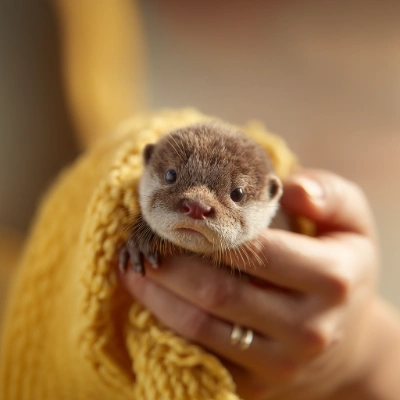
Bria: 이미지 아웃페인팅
매끄러운 이미지 확장과 가장자리 인식 장면 확장을 위해 설계된 전문 Bria 기반 아웃페인팅 템플릿입니다.
 Comfy Cloud에서 열기
JSON 다운로드 또는 템플릿 라이브러리에서 "Bria: Image Outpainting" 검색
**입력 자료**
이 파일을 해당 `LoadImage` 노드에 업로드하세요:
`LoadImage` 노드 11 · `baby_otter.png`
Comfy Cloud에서 열기
JSON 다운로드 또는 템플릿 라이브러리에서 "Bria: Image Outpainting" 검색
**입력 자료**
이 파일을 해당 `LoadImage` 노드에 업로드하세요:
`LoadImage` 노드 11 · `baby_otter.png`